





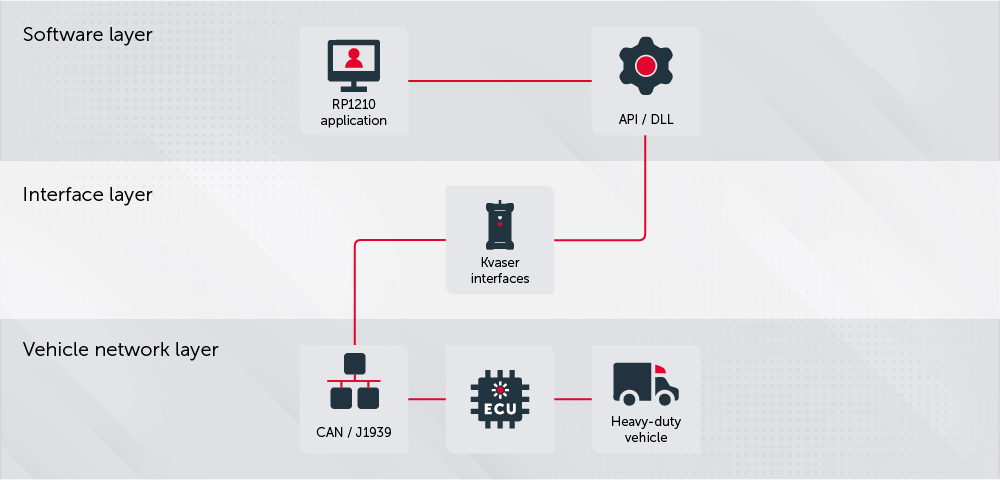
Introduction to RP1210 (RP1210C)
RP1210 is a recommended practice developed by the Technology and Maintenance Council (TMC). It defines a standardized API for communication between Windows-based PC applications and Electronic Control Units (ECUs) in heavy-duty vehicles.
RP1210 is commonly used for:
• Vehicle diagnostics
• ECU reprogramming
• CAN communication
• SAE J1939 diagnostics
• ISO15765 diagnostics
• Fleet maintenance tools
The RP1210 standard allows software applications to communicate with hardware interfaces from different manufacturers through a common API. This reduces the need for hardware-specific integrations and makes it easier to support multiple vehicle communication interfaces.
Background
As vehicle electronics became more advanced, the need for tools to analyze and reprogram ECUs increased. Historically, each vehicle manufacturer used proprietary diagnostic tools and communication methods. This made vehicle diagnostics expensive and difficult to standardize across brands.
Repair workshops working with multiple vehicle manufacturers often needed separate hardware and software tools for each brand.
RP1210 introduced a standardized API between PC applications and vehicle communication hardware. This made it possible for multiple hardware manufacturers to support the same diagnostic applications without requiring hardware-specific integrations.
The OEM typically provides the diagnostic or ECU programming application, while the hardware manufacturer provides the RP1210-compatible communication interface.
RP1210 versions
RP1210 has evolved though several revisions, including RP1210A, RP1210B, RP1210C, and RP1210D
The Kvaser RP1210 implementation is based on RP1210C and currently supports CAN and SAE J1939 communication.
RP1210A
Introduced a standardized API for communication between Windows applications and vehicle communication adapters.
RP1210C
Introduced updates for modern diagnostic and vehicle communication applications while maintaining backward compatibility with earlier RP1210-based software.
RP1210B
Introduced several updates, including:
• J1850 support becoming optional
• Configurable CAN bit rates
RP1210D
A newer revision of the RP1210 specification with additional updates to the standard.
General requirements
The RP1210 API is designed for Microsoft Windows environments.
Any RP1210-compliant hardware device should work together with any RP1210-compliant software application that supports the same operating system. This means both the hardware and software must conform to the RP1210 specification.
Communication between the PC and the Vehicle Datalink Adapter (VDA) is defined by the hardware manufacturer. Common connection methods include:
• RS-232
• USB
• Bluetooth
• Ethernet
• Wi-Fi
The hardware manufacturer also provides a driver (DLL) that manages communication between the PC application and the VDA. The PC application does not need to know how the VDA communicates with the vehicle network. It communicates through the standardized RP1210 API.
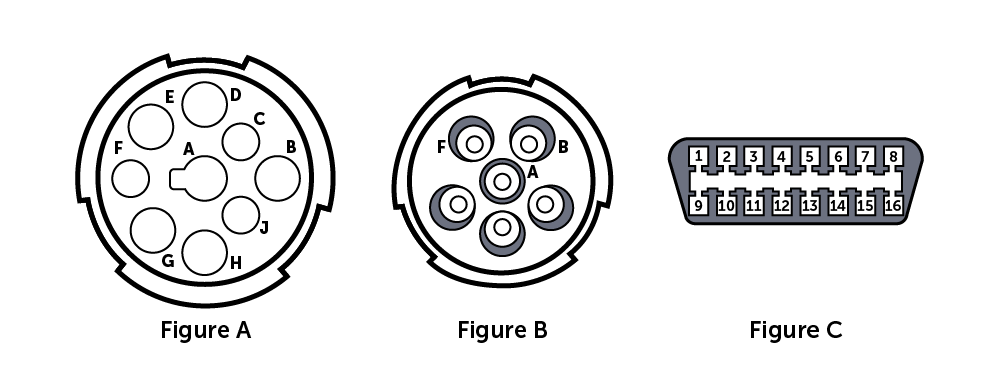
Vehicle connectors vary depending on the vehicle manufacturer, model, and application. While some connector types are commonly used in specific vehicle segments, the connector itself does not determine which communication protocols are available.
Common examples include:
• 9-pin Deutsch connectors used in many heavy-duty vehicles (Fig. A).
• 6-pin Deutsch connectors found on older heavy-duty vehicles (Fig. B).
• J1962 (OBDII) connectors used for diagnostics and service access (Fig. C).
The communication protocols available on a connector depend on the vehicle implementation and manufacturer-specific usage of connector pins.
SAE RP1202 provides additional guidance on diagnostic connector implementations used in vehicle applications.
Most hardware manufacturers provide cables and connectors for the vehicle networks supported by their products.
Kvaser and RP1210
Kvaser interfaces support CAN and SAE J1939 communication in RP1210-compatible environments.
The Kvaser RP1210 API enables RP1210-compatible applications to communicate with Kvaser CAN interfaces through a standardized RP1210 interface.
Current Kvaser RP1210 support includes CAN and SAE J1939 communication, with additional protocol support planned for future releases.
Kvaser interfaces can be used in applications for:
• Vehicle diagnostics
• ECU communication
• Data logging
• Service tool development
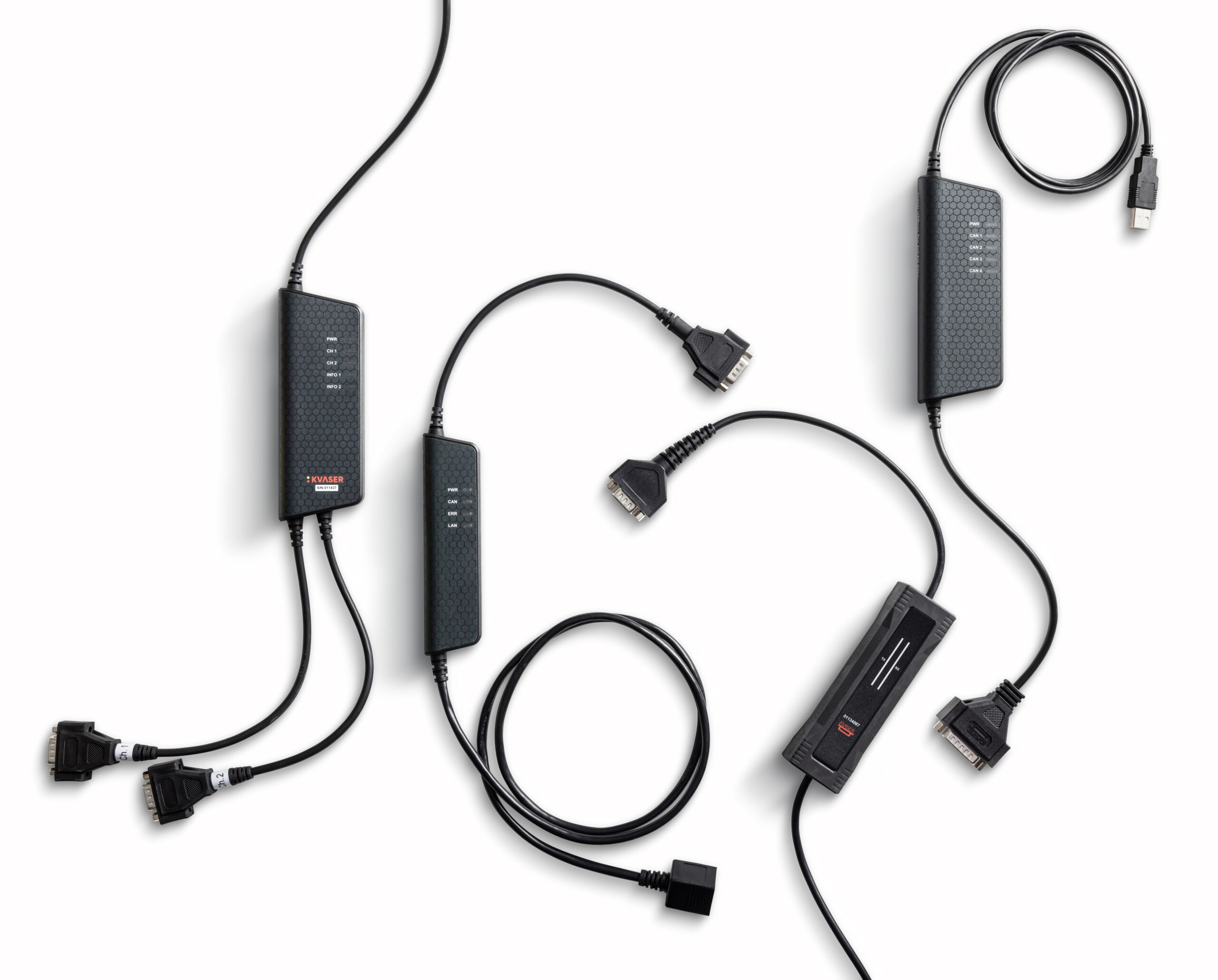
Combined with Kvaser CAN interfaces and software development tools, RP1210 applications can integrated into diagnostic and vehicle communication workflows.
Using a Kvaser interface with RP1210 applications
To use a Kvaser CAN interface with an RP1210-compatible application, both hardware and software components are required.
Choosing a Kvaser interface
All Kvaser CAN interfaces can be used with RP1210-compatible applications, as RP1210 support is provided through software. When selecting a Kvaser device, the choice depends on your application requirements rather than RP1210 compatibility.
For example:
• USB interfaces are commonly used for service and diagnostic tools connected to a laptop.
• Rugged or embedded interfaces are suitable for in-vehicle or permanent installations.
• Multi-channel interfaces are used in more advanced diagnostic or data logging setups.
Using Kvaser with RP1210 applications
To use a Kvaser interface with RP1210-compatible applications, install:
• Kvaser Drivers for Windows
• Kvaser RP1210C API
The RP1210C API installer also assists with configuration of the required RP1210 INI files used by RP1210-compatible applications.
Connecting to your application
Once the drivers are installed:
- Connect your Kvaser interface to the PC.
- Start your RP1210-compatible application.
- Select the Kvaser RP1210 driver from the list of available devices.
- Choose the appropriate communication channel.
After this setup, the Kvaser interface behaves like any other RP1210-compliant device and can be used for diagnostics, ECU communication, or data logging.
RP1210 DLL architecture
Each hardware manufacturer provides a DLL with a unique name. This allows the PC application to select which hardware interface to use.
The DLL implements the standardized RP1210 API functions while also handling the manufacturer-specific communication protocol between the PC and the hardware interface.
The communication method between the PC and the hardware interface is not defined by RP1210. Manufacturers may use USB, RS-232, Bluetooth, or other communication technologies.
This design allows applications to use the same RP1210 API regardless of how the hardware interface communicates with the PC or vehicle network.
The Kvaser RP1210C API implementation supports:
• CAN and SAE J1939 communication
• Configurable baud rates up to 1000 kbit/s
• Automatic baud rate detection
• Multi-application support for CAN and J1939
• 32-bit and 64-bit applications
• All Kvaser CAN interfaces
RP1210 API functions
The RP1210 API defines a set of standardized functions for communication between a PC application and a Vehicle Datalink Adapter (VDA) connected to a vehicle network.
A VDA provides the physical connection to the vehicle communication bus, while the RP1210 API provides standardized control and messaging functions. The PC application uses the RP1210 API to exchange commands and vehicle data with vehicle ECUs through the VDA.
The VDA is accessed through the RP1210 DLL but internally uses manufacturer-specific hardware and communication interfaces.
The RP1210 standard defines several API functions:
| Function Name | Brief Description |
|---|---|
| RP1210_ClientConnect | Establishes a logical client connection with the API DLL. |
| RP1210_ClientDisconnect | Disconnects the logical client application from the API DLL. |
| RP1210_SendCommand | Sends a command to the API DLL for things like filtering, etc. |
| RP1210_SendMessage | Places a message in the transmit buffer to be sent on the associated diagnostic bus |
| RP1210_ReadMessage | Retrieves the next buffered message received on the associated diagnostic bus |
| RP1210_ReadVersion | Reads version information from the API, about the API. |
| RP1210_ReadDetailedVersion | Newer more comprehensive version information command. This command is now preferred over the RP1210_ReadVersion call. |
| RP1210_GetErrorMsg | Translates an RP1210 error code into a textual description of the error. |
| RP1210_GetHardwareStatus | Returns information state of the connection and data link. |
ECU reprogramming is performed by sending ECU-specific messages through the RP1210_SendMessage function.
RP1210_SendCommand is used to configure and control VDA behavior. Common functions include:
• Resetting the hardware device
• Configuring message filters
• Configuring protocol-specific broadcast messages
• Protecting or releasing J1939 addresses
• Configuring ISO15765 flow-control behavior
• Controlling multi-application access to a VDA
• Enabling or disabling message echoing
RP1210 supports both inclusive and exclusive filtering. Inclusive filtering allows only selected MID, PGN, or CAN-ID values to pass. Exclusive filtering blocks selected values while allowing all others.
Echoed messages are transmitted messages that are also returned to the receive buffer. Echoing is disabled by default.
Typical use cases
Heavy-duty vehicle diagnostics
RP1210 is commonly used in heavy-duty vehicle diagnostic applications to communicate with ECUs in trucks, buses, and other heavy-duty vehicles. Technicians can read and clear diagnostic trouble codes (DTCs), monitor live vehicle data, and perform service operations.
Fleet maintenance tools
Fleet maintenance applications use RP1210 to support communication adapters from different manufacturers through a common API. This makes it possible to use the same software across mixed vehicle fleets and hardware setups.
RP1210 vs J2534
RP1210 and J2534 are both standardized APIs used for vehicle diagnostics and ECU communication, but they are commonly used in different vehicle segments.
RP1210 is primarily used in heavy-duty vehicle diagnostics and is commonly associated with protocols such as SAE J1939 and J1708/J1587.
J2534 is primarily used in passenger vehicle diagnostics and is widely used for emissions-related ECU reprogramming and OBDII communication.
 1...2...3...