





Containerization on Kvaser Edge
Edge computing systems need to be flexible, robust and easy to maintain. Containerization with Linux (LXC) containers provides a practical way to package a complete Linux environment together with its application, in a clean, consistent way.
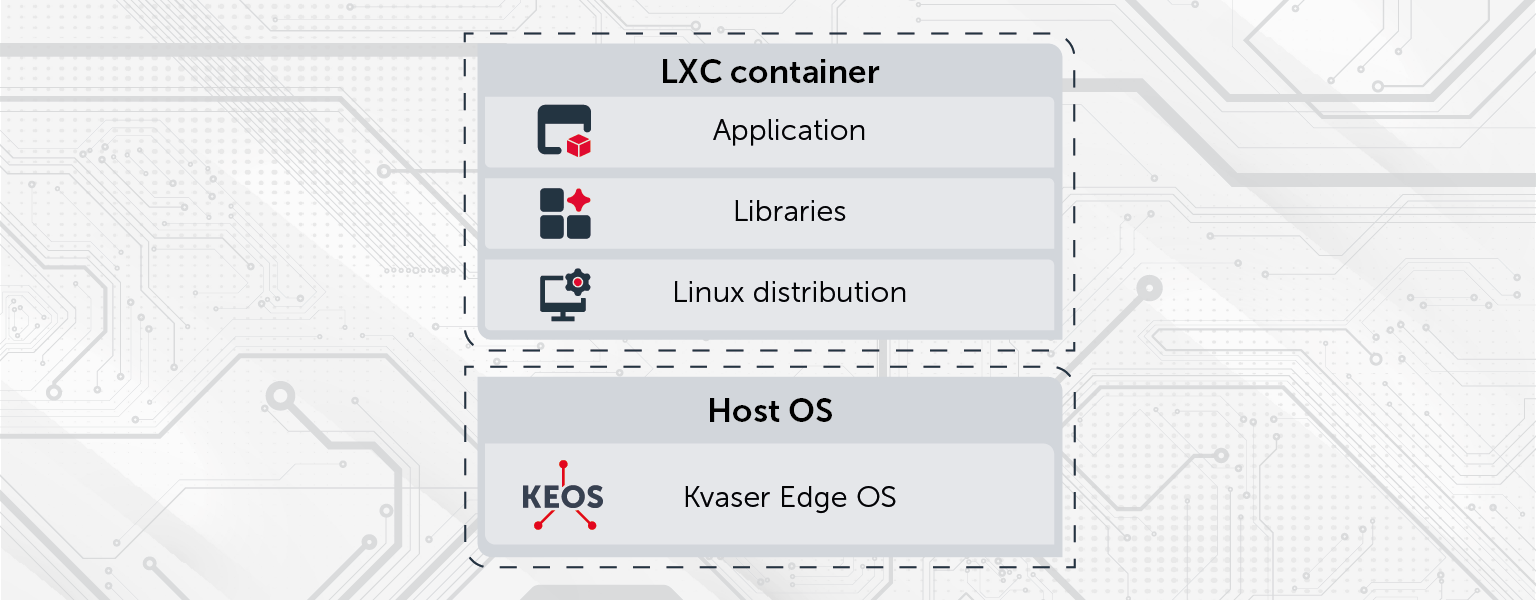
On Kvaser Edge, KEOS (Kvaser Edge OS) provides the foundation for running an LXC container. KEOS allows applications to run in isolation with minimal overhead, which is ideal for embedded and industrial use cases where reliability and controlled updates matter. Applications built using SocketCAN or Kvaser CANlib (CANlib support available for Kvaser Edge, May 2026) can run inside a container, making it easy to reuse existing CAN-based software.
Explore Kvaser Edge and KEOS to learn more about the hardware and software, and their capabilities.
How containerization works
Containerization means bundling the application together with everything it needs to run: a Linux distribution, required libraries and tools, configuration files and the application itself. The container leverages KEOS for system resources, but operates in a fully isolated environment, ensuring both efficiency and system safety.
LXC provides a separate Linux user space, allowing applications to operate in a familiar environment with native performance and minimal overhead. This isolation reduces risk and simplifies long-term maintenance.
Ready-to-run application environment
The packaged environment becomes a container image, which includes Linux distribution, dependencies, applications, and configuration. Once created, it can be deployed directly to the Kvaser Edge.
Once deployed, the container runs in isolation from the operating system, KEOS. You can start, stop or restart it without affecting KEOS. If the application stops or fails, the rest of the system continues to run as expected, making recovery and troubleshooting straightforward.
Note! It is recommended to always keep a local copy of the container image with the application. This ensures you can quickly redeploy or restore the container if anything happens to the Kvaser Edge device, such as theft or similar events.
Managing updates
Containerization enables a clear and reliable update process. Updates are performed by building a new container image that includes the updated application and libraries, and then replacing the existing container on the device. If an issue is detected, it is possible to roll back to the previous container image.
Visit the Kvaser Edge OS manual for detailed documentation about system behavior, and container handling.
Container workflows
Maintaining a container on Kvaser Edge can be done using two approaches; You can either choose the scalable and reproduceable workflow which keeps image deployment structured and predictable, or use the traditional approach if you want to work directly in the live environment.
Scaleable and reproducable workflow
- Development: Develop and maintain the application code and configuration as a single, authoritative source.
- Build container: Create a container image that packages the application and its environment for deployment.
- Run & debug: Install the container on Kvaser Edge, run the application and observe the behavior on the device.
- Feedback & learn: Review logs and results to understand behavior, identify issues and gather insights.
Repeat the controlled container workflow as needed to continuously improve the application while keeping the container stable and predictable.
Traditional workflow
- Login to the device – Access the device directly, e.g. via SSH.
- Edit files and apply quick fixes – Make the changes necessary in the live environment.
Note! If the Kvaser Edge is reflashed or redeployed, local changes on the device will be lost.
Using existing CAN applications in the container
Applications that are already written for SocketCAN or Kvaser CANlib (CANlib support available for Kvaser Edge, May 2026) can be installed directly inside the container without major modification. The container provides a standard Linux environment, allowing existing CAN-based applications to run as they would on a conventional Linux system.
Access to CAN interfaces is exposed to the container in a controlled manner, ensuring reliable communication with the hardware while maintaining isolation from KEOS. This makes it possible to reuse existing code and tools, reducing porting effort and accelerating deployment on Kvaser Edge.
Benefits of containerization
- Predictable deployment: Applications behave the same from development to the field.
- Simplified updates: Containers can be updated or rolled back without impacting KEOS.
- Isolation: Failures in the application do not affect KEOS or the Kvaser Edge.
- Control: Access to resources is explicitly defined.
- Reduced risk: Dependency issues and integration problems are minimized.
This approach provides a reliable foundation for running containerized Linux systems on Kvaser Edge while keeping the system stable and easy to maintain.
Build for scalable Edge deployments
LXC containerization provides a solid foundation for deploying, managing and updating Linux applications on Kvaser Edge. It combines full Linux environments with the efficiency and control required for edge computing.
 1...2...3...